One-off setup
- Process mapping
- Data contract
- Build
- Failure testing
- Go-live with runbooks
We scope, build and run integrations between RDCopilot apps, Microsoft 365, automation tools and any REST API. Every run has retries, an owner and a log you can read. After go-live we host, monitor and update it. If you prefer to run it in-house, we hand it over with runbooks.
Before anything goes live we agree what happens when data is missing, a system is down or a person has to decide. Scroll through one run, captured from the console further down.
An opportunity is qualified, an invoice arrives, a receipt is confirmed. The run validates and maps the record against the data contract, and each step writes a plain line to the log.
Data error: the owner corrects the source, then the run replays.
The run waits at the gate with the payload in view. Approve and it continues; nobody answers and it escalates on the agreed route. The decision stays in the audit trail.
Temporary failures retry with exponential backoff. Each attempt carries the same idempotency key, so the second try completes the same order instead of writing a second one, where the destination accepts the key.
After the last attempt: dead-letter queue, and the owner is alerted.
Source and destination are reconciled on the schedule in the data contract. A record stuck between systems shows up with its owner, and alerts name the flow, the queue and the reason.
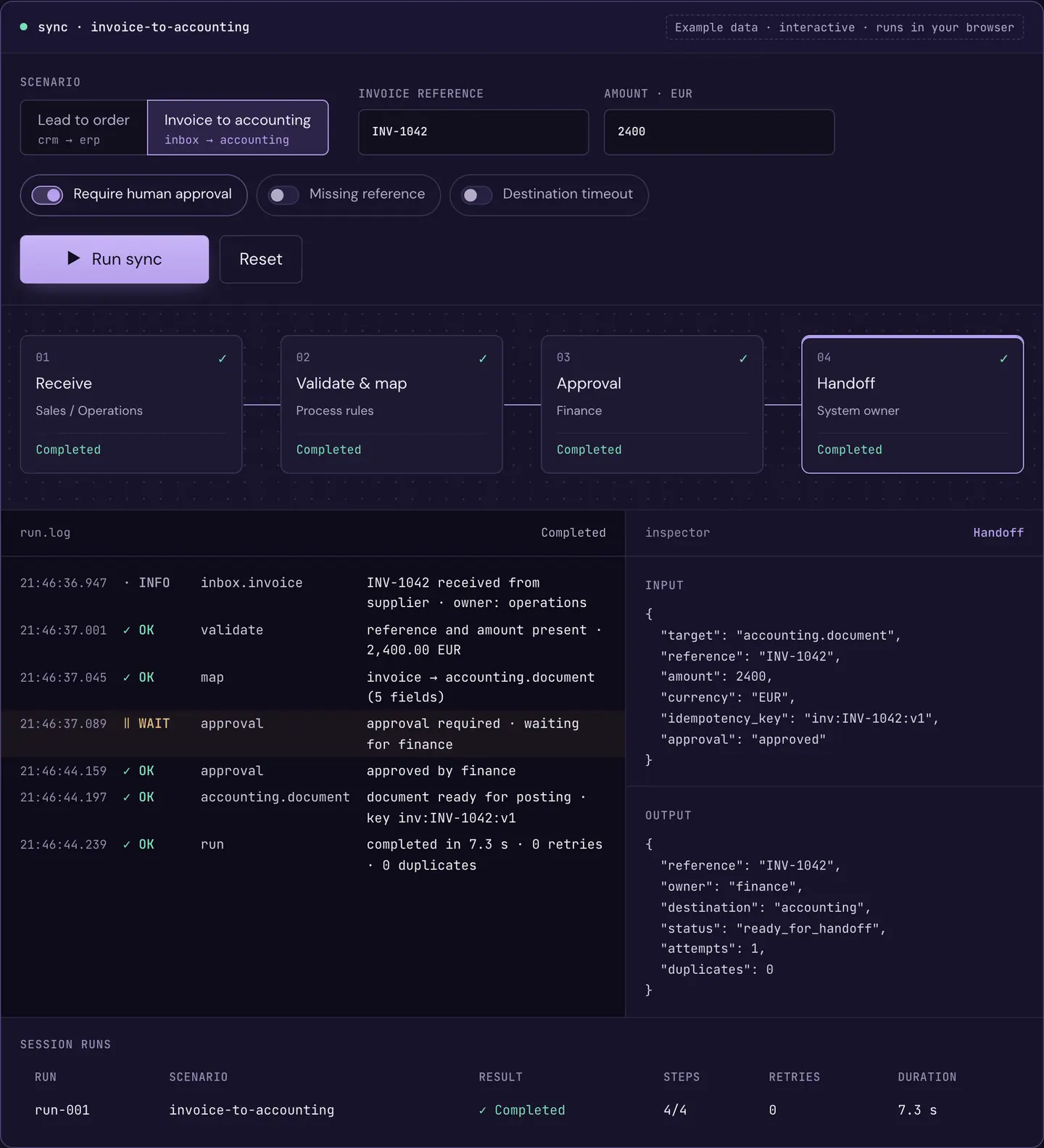
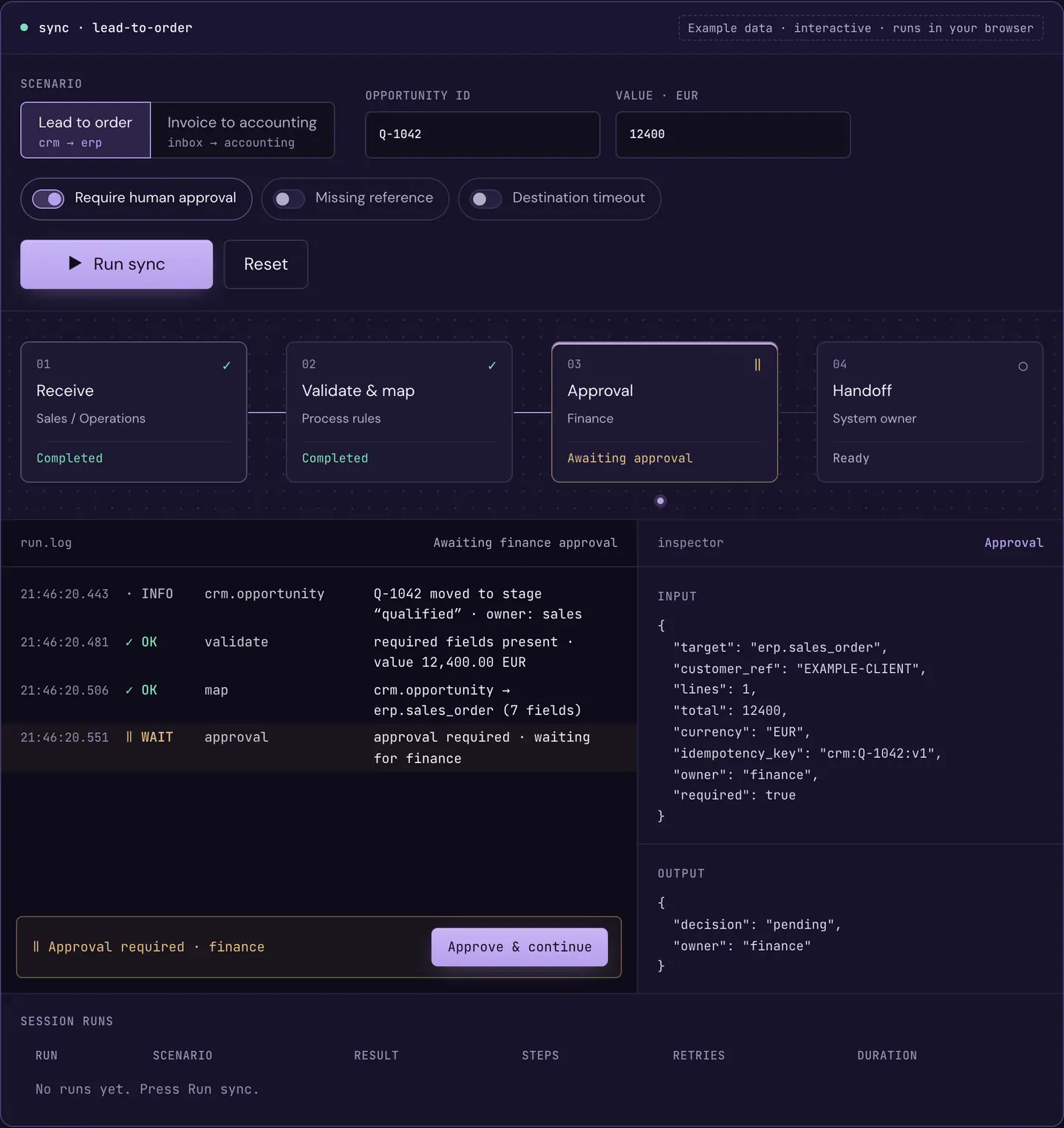
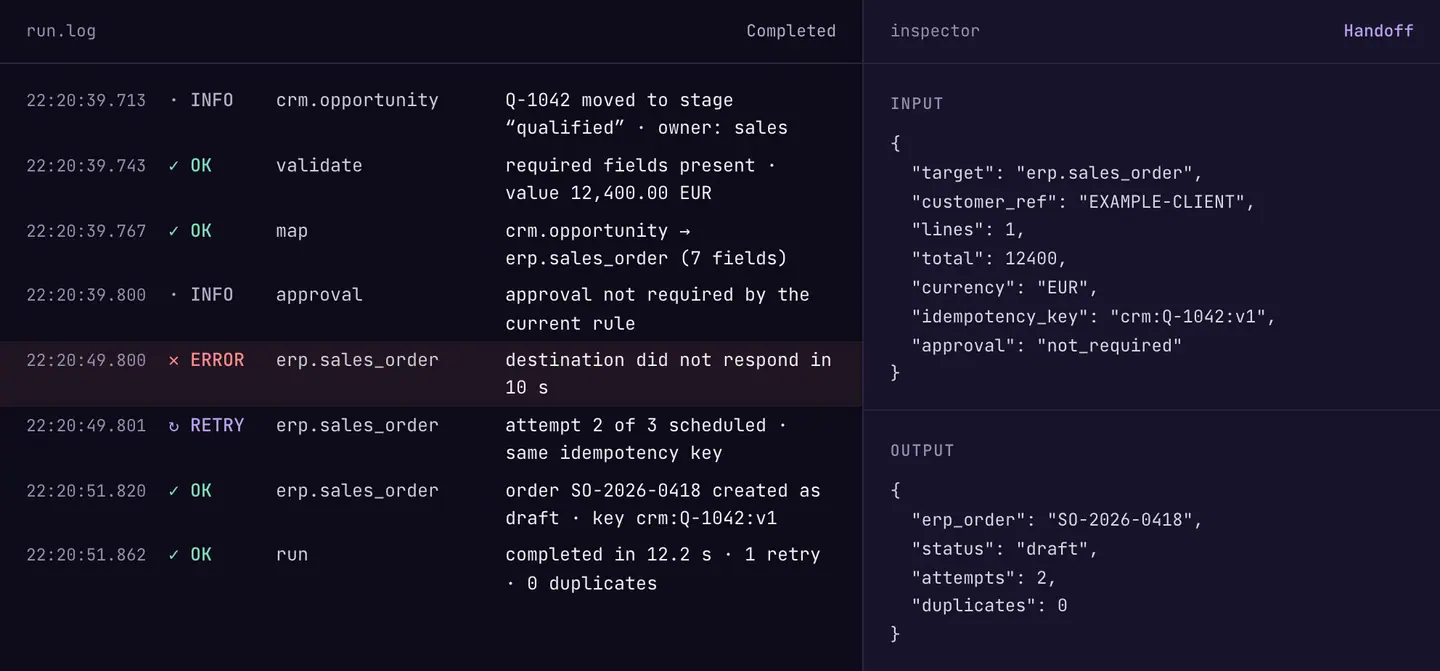
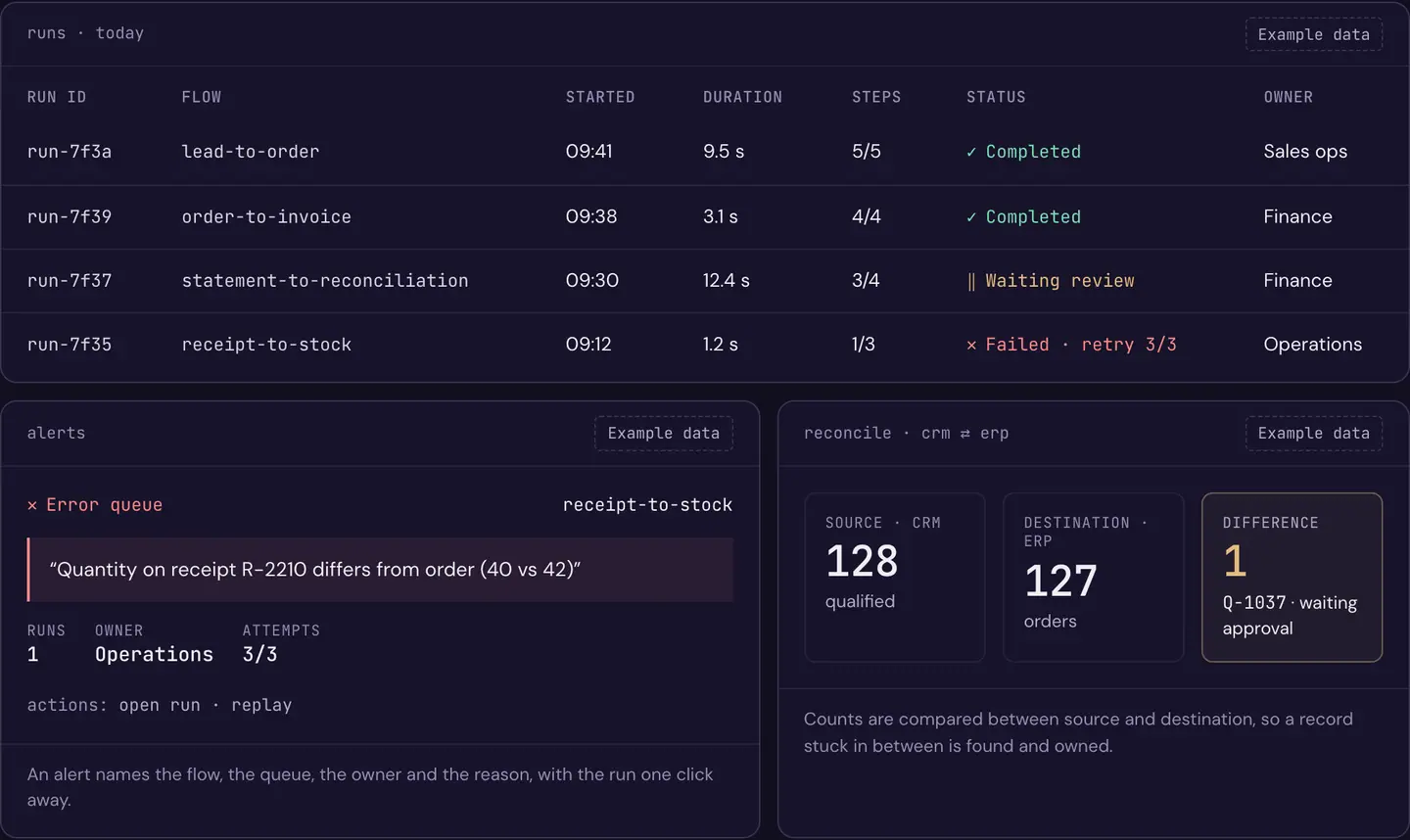
Example data · captured from the interactive console on this page
Each record carries a key, so a retry updates the same order and does not create a second one, where the destination accepts the key.
In integrations we run, temporary failures retry with exponential backoff and jitter; after the last attempt the run moves to the dead-letter queue and the owner is alerted.
A run can wait for a named person, with an escalation route and a record of the decision.
In integrations we run, you fix the source record and the run replays from the failed step.
Counts and totals are compared between source and destination on the schedule set in the data contract, so a stranded record is found and owned.
Pick a scenario, change the conditions and press Run. Each step writes a plain line to the log, including pauses, failures and retries.
runready · press Run sync to start{}Waiting for this step.
| Run | Scenario | Result | Steps | Retries | Duration |
|---|---|---|---|---|---|
| No runs yet. Press Run sync. | |||||
Each connection is scoped for your project: which events, which fields, which direction and who owns it. Event names below are examples; the data contract is agreed with you.
For companies operating in Romania: e‑Factura, e‑Transport, e‑TVA, declarations and REGES-ONLINE run through the RDCopilot localisation apps.
crm bothOpportunities, contacts and activities.
opportunity.qualifiedcontact.updatedpos outClosed sales and end-of-day totals.
sale.closedday.closederp bothOrders, invoices and master data.
sales_order.createdinvoice.issuedinventory bothStock levels and reorder signals.
stock.below_reorderitem.updatedwarehouse bothReceipts, picks and shipments.
receipt.confirmedshipment.dispatchedaccounting inJournal entries and documents to post.
entry.posteddocument.receivedbanking outStatements and matched transactions.
statement.importedtransaction.matchedreports inDatasets for dashboards.
dataset.refreshedhr outHires, changes and leavers.
employee.hiredemployee.updatedpayroll bothApproved payroll runs.
payroll.approvedreges inContracts and contract changes for REGES-ONLINE.
contract.change_readyefactura bothERP invoices sent to the RDCopilot e‑Factura app, with the RO e‑Factura state and ANAF’s response brought back.
invoice.uploadedinvoice.validatedinvoice.rejectedetransport bothe‑Transport notifications and their UIT codes, through the RDCopilot e‑Transport app.
uit.issuedetva outPre-filled RO e‑TVA return compared with your D300 VAT return, through the RDCopilot e‑TVA app.
comparison.readydeclarations inData for D100, D101, D300, D390, D394 and D406 (SAF-T).
declaration.readym365 bothApprovals, mail and files in your Microsoft environment.
approval.completeduipath bothDesktop and legacy screens with human validation.
job.completedtask.validatedai inDocument and text steps with a person in the loop.
extraction.readyrest bothAny documented HTTP API.
GET/POST per contractwebhook inEvents pushed by your systems, verified by HMAC signature and timestamp where the sender supports it, and de-duplicated by event ID.
POST /hooks/{source}Don’t see your system? If it has an API, a webhook, a file export or a stable screen, we can scope it. Tell us about it
Need documents read before they move? See Document workflows and Private AI workspace.
crm → erp erp → e-factura → accounting banking → accounting warehouse → inventory hr → payroll → reges inbox → validate → accounting power automate → erp uipath → erp accounting → reports Every run is logged step by step with record IDs, result codes and the owner, and failures alert the person who can fix them. What else is logged, and for how long, is set in the data contract. We watch those alerts for you; if your team runs the integration, it gets them with runbooks.
| Run ID | Flow | Started | Duration | Steps | Status | Owner |
|---|---|---|---|---|---|---|
run-7f3a | lead-to-order | 09:41 | 9.5 s | 5/5 | Completed | Sales ops |
run-7f39 | order-to-invoice | 09:38 | 3.1 s | 4/4 | Completed | Finance |
run-7f37 | statement-to-reconciliation | 09:30 | 12.4 s | 3/4 | Waiting review | Finance |
run-7f35 | receipt-to-stock | 09:12 | 1.2 s | 1/3 | Failed · retry 3/3 | Operations |
receipt-to-stock“Quantity on receipt R-2210 differs from order (40 vs 42)”
actions: open run · replay
Q-1037 · waiting approvalEach connection has its own credentials, limited to the objects and actions it needs and agreed in the data contract. In your own Microsoft 365, UiPath or other automation tools they stay in that tool’s credential store.
Every connection and every exception type has a named owner, agreed in the data contract.
Mapping changes, approvals and replays are recorded with who and when.
The data contract lists every field that moves, and nothing else is copied (data minimisation, GDPR Art. 5).
Integrations RDCopilot hosts run on EU infrastructure; flows that run inside your Microsoft 365, UiPath or other self-hosted tools stay where those tools are hosted, and we record that in the data contract. Log retention is set in the data contract.
Mappings are versioned and tested against failure cases before release.
We sit with the people who re-key the data and measure where it gets stuck.
You get process map and a shortlist of what to connect first
Fields, directions, rules, approvals, owners, where each part runs and what counts as done.
You get a signed-off contract and acceptance tests
We build one controlled path and test rejection, missing data, timeouts and replay.
You get a working integration in a test environment
We host, monitor and update it under the monthly licence, or hand it over to your team with runbooks and alerts.
You get run history, alerts and runbooks
| Field | Direction | Owner | Rule | On failure |
|---|---|---|---|---|
opportunity_id | crm → erp | Sales ops | required, unique | return to sales |
customer_ref | crm → erp | Finance | must exist in ERP | pause, alert owner |
total + currency | crm → erp | Finance | approval required | wait for approver |
erp_order | erp → crm | System owner | written back once | retry 3×, same key |
hosting: RDCopilot EU · log retention: set in the data contractChoose the first API integration by the manual work it removes Flows that use Power Automate premium connectors need a Power Automate Premium licence from Microsoft; UiPath robots are licensed by UiPath. We list them separately in the quote. Flows on those tools run where the tool is hosted.
Approval flows stay in your Microsoft environment. We connect them to RDCopilot apps and agree connector permissions, environment policies and licence requirements.
We give a fixed quote once we know the process, the systems and the volumes. No per-run or per-task charges.
When a connected API changes, we tell you and estimate any adaptation at the hourly rate. New flows, fields or systems are estimated the same way before we start.
Already run flows in Power Automate, UiPath or another automation tool? RDCopilot Integrations connects to them, so they keep running where they are.
From idea to implementation
Choose a first API integration from a real manual handoff, with clear data ownership, destination results, exception handling and a buildable project brief.
Read guideMonitor integrations through the business completion signal, queue age and missing activity, with owned exceptions and tested recovery for stranded records.
Read guidePrevent retries from duplicating business records through stable operation identity, stored outcomes and destination-specific recovery for uncertain API results.
Read guideNo. We scope and build each integration with you and test how it fails. After go-live we host, monitor and update it under the monthly licence. If you prefer to run it in-house, we hand it over with runbooks and alerts.
All RDCopilot apps, Microsoft 365 and Power Automate, UiPath, workflow tools you host yourself, and any system with a documented REST API or webhooks. Systems with only file exports or desktop screens are assessed case by case.
No. An integration can link two of your existing systems. RDCopilot apps connect with less setup because we already know their data.
The run retries with exponential backoff. After a timeout it first checks whether the destination already received the record, using the same idempotency key, so a retry does not create a duplicate. The data contract lists which destinations support this. After the last attempt the run moves to the dead-letter queue and the owner gets an alert.
Integrations RDCopilot hosts run on EU infrastructure; flows that run inside your Microsoft 365, UiPath or other self-hosted tools stay where those tools are hosted, and we record that in the data contract. Only the fields listed in the contract move between systems, and log retention is set in the data contract.
Yes. Where an integration processes personal data for you, RDCopilot acts as processor under a data processing agreement (GDPR Art. 28), and the data contract lists the fields, systems and retention.
Yes. Any step can wait for a named approver, with an escalation route if nobody answers, and the decision is kept in the audit trail.
For companies operating in Romania, e‑Factura, e‑Transport and e‑TVA run through the RDCopilot localisation apps, authorised with the company’s qualified digital certificate (ANAF OAuth). Your ERP sends the invoice to the app, and its ANAF state comes back to your ERP and accounting: the signed response when it is accepted, or ANAF’s error message when it is rejected. The status view shows which invoices are not uploaded yet (the law gives 5 working days from issue) and when the certificate access is due for renewal, at least once a year.
A one-off setup fee and a monthly licence, quoted after we scope the process. The licence is a fixed monthly amount, with no per-run charges. Third-party licences such as Power Automate Premium or UiPath, if needed, are listed separately.
Tell us the process, the systems involved and where it gets stuck. We reply with a scoping proposal.
© 2026 R&D COPILOT Made in EU Contact form